EVS task management
& housekeeping tracking
for long-term care.
EVS Tasks is environmental services tracking, room-by-room cleaning checklists, progress dashboards, and compliance documentation for skilled nursing facilities and long-term care communities — all from the phone your housekeeping team already carry. Open a room, work the daily and weekly checklist, and watch the facility’s progress climb in real time. Anything not done on schedule flags itself MISSED, so LTC facility cleaning compliance is enforced, not remembered.
Complete environmental services tracking, on one phone.
From the daily checklist in a single room to the facility-wide compliance report — one connected nursing home housekeeping management system, built for the cart and the floor.
Every room knows what to clean — and what got skipped.
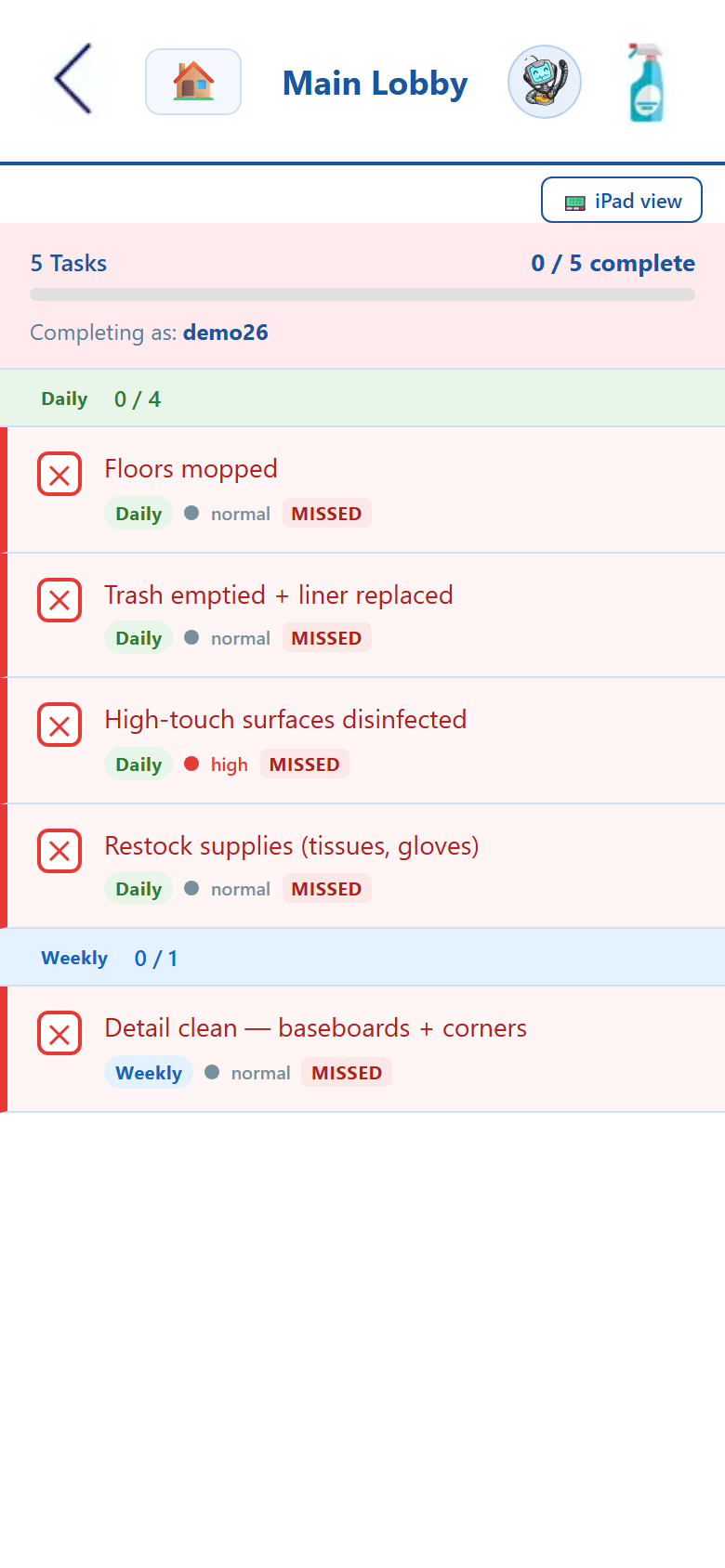
Open any room and the day’s checklist is already built: floors mopped, trash emptied, high-touch surfaces disinfected, supplies restocked, plus the weekly detail clean. Tap each task done and the room’s progress climbs. Miss the window and the task flips to MISSED — in red, on the list, no supervisor review needed. That auto-flagging is what turns a housekeeping task app on a nursing home floor into real LTC facility cleaning compliance: the cadence is enforced, not left to memory.
- ✓ Daily and weekly tasks, grouped per room
- ✓ Overdue tasks auto-flag MISSED in red
- ✓ High-touch & infection-control tasks marked high-priority
- ✓ Tap to complete — completion is time-stamped to the tech
See the whole facility — then drill to a single room.
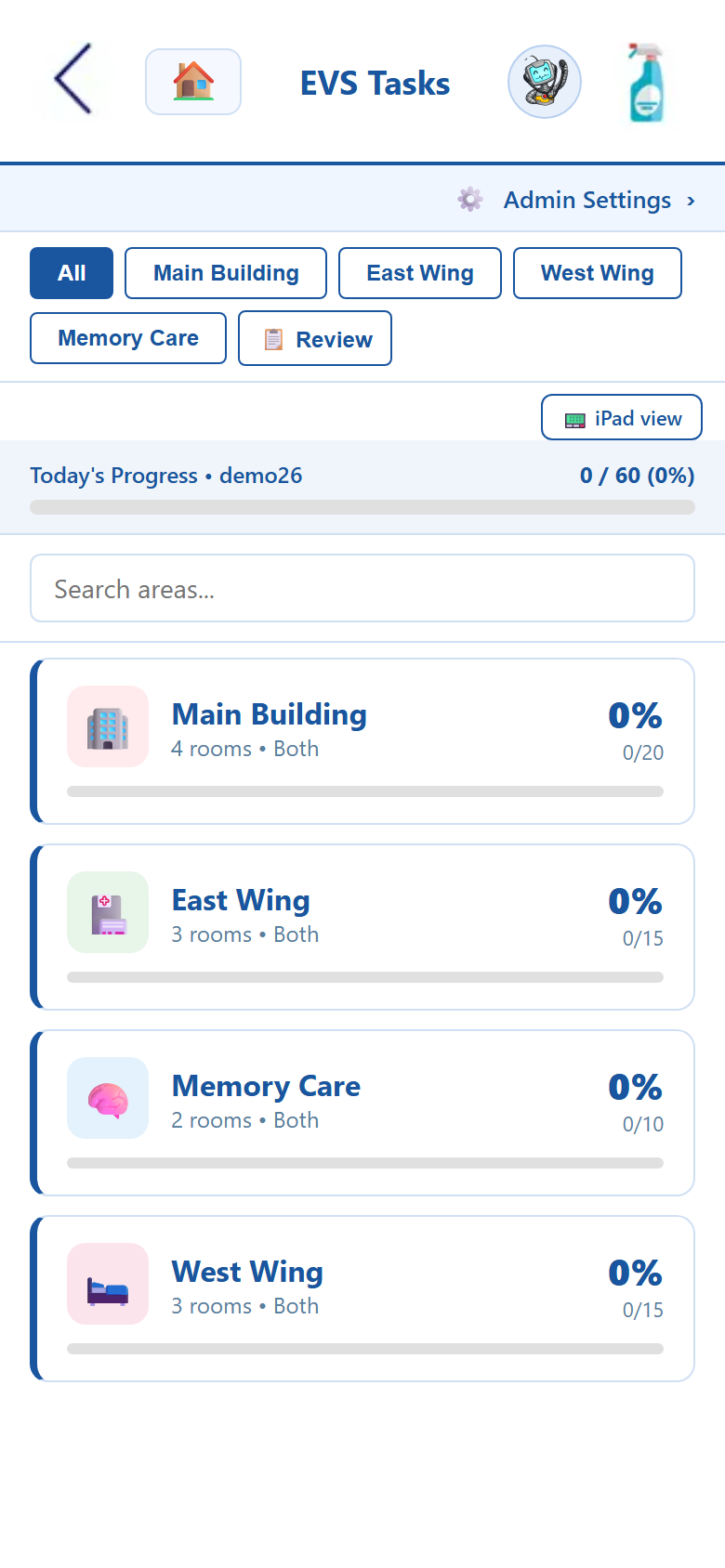
EVS Tasks mirrors your building: Main Building, East Wing, West Wing, Memory Care, each with its own rooms and its own progress bar. Supervisors open the environmental services tracking dashboard and see today’s completion by area in real time — “Main Building 0/20, East Wing 0/15” — then tap into a wing, then a room, to see exactly what’s left. Filter by wing so each EVS tech sees only their assignment, and search to jump straight to any room in a large facility.
- ✓ Building → wing → room hierarchy that matches your floor plan
- ✓ Live progress dashboard, by area, updated as work happens
- ✓ Filter by wing; search to jump to any room
- ✓ iPad view for a supply-closet or nurse-station station
Survey-ready cleaning logs, without a clipboard.
Every completed and missed task keeps a permanent, time-stamped record tied to the staff member who did it. When a surveyor or your QA team asks for cleaning documentation, your SNF environmental services logs already exist — filter by date, area, or room and export in seconds. Admin reporting rolls completion up by area, room, day, and staff member, so healthcare EVS software leaders manage by exception instead of walking every hall with a checklist.
- ✓ Permanent, time-stamped record of every task
- ✓ Completion reports by area, room, day & staff member
- ✓ Export-ready compliance documentation for surveyors
- ✓ Supervisor Review & sign-off before the day closes
Nursing home housekeeping management, end to end.
Room checklists, room-by-room tracking, progress dashboards, missed-task flagging, admin reporting, and compliance documentation — turn on what your facility runs, the rest is waiting when you need it.
HIPAA-compliant, by design.
EVS Tasks runs inside resident care areas and keeps a record of who cleaned what and when, so it’s built to the same HIPAA standard as the rest of MyLTCApps — encrypted, access-controlled, and hosted in U.S. data centers. QR-code logins keep shared carts and station screens secure without passwords on a sticky note, and every task keeps a permanent, paperless audit trail for LTC facility cleaning compliance.
This is the EVS task management software on day one.
Real screens from the live app — the facility dashboard your supervisors watch, and the room checklist your housekeeping team works through.
EVS & housekeeping software FAQ
How environmental services tracking, room checklists, missed-task flagging, and compliance documentation work in a skilled nursing or long-term care setting.
What is EVS task management software for nursing homes?
EVS task management software gives your environmental services and housekeeping team a digital checklist for every room in the building. Instead of paper logs, each EVS tech opens the housekeeping task app on a phone, sees the daily and weekly cleaning tasks for their assigned rooms, and taps each one complete. Supervisors get live progress dashboards and a permanent record — so nursing home housekeeping management runs off real data, not a clipboard.
How does room-by-room cleaning tracking work?
The app mirrors your real facility: buildings, wings, and individual rooms. A tech drills from Main Building down to the Main Lobby or a patient room and sees that room’s exact checklist — floors mopped, trash emptied, high-touch surfaces disinfected, supplies restocked. Every completion rolls up into building- and facility-level progress, giving you true environmental services tracking from the single room to the whole campus.
How are missed cleaning tasks handled?
Any task that isn’t completed within its window is flagged MISSED automatically — shown in red on the room’s list and rolled into the area’s progress total. No supervisor has to hunt for what slipped. This auto-flagging is what turns a checklist into LTC facility cleaning compliance: the system enforces the cadence and surfaces gaps the moment they happen.
Does the system create compliance documentation for surveyors?
Yes. Every completed and missed task is time-stamped and tied to the staff member who did it, building a permanent paperless cleaning log. When a state surveyor or your QA team asks to see environmental services records, the documentation already exists — you filter by date, area, or room and export it in seconds. That audit trail is built into the healthcare EVS software, not bolted on after.
Can supervisors see cleaning progress across the whole facility?
They can. The progress dashboard shows today’s completion by area in real time — how many of the Main Building’s tasks are done, how the East Wing compares, where attention is needed right now. Admin reporting then breaks completion down by area, room, day, and staff member, so SNF environmental services leaders manage by exception instead of walking every hall.
Will the EVS app work for assisted living or a hospital too?
It will. While the app is built for skilled nursing facilities and long-term care communities, the same environmental services tracking — room-by-room checklists, missed-task flagging, progress dashboards, and compliance documentation — works just as well for assisted living housekeeping or a hospital EVS department. Any facility that cleans rooms on a schedule can run nursing home housekeeping management the same way.
See the apps on your own phone.
Drop your details and we'll email you a link to the live demo. Click around on your own time, then click Sign Up Now inside the demo to see pricing.